
This evening, I was scrolling through the “RIVIAN Electric Vehicles Discussion” group on Facebook when I stumbled upon a post that caught my eye, not because of a cool modification or a long-range achievement, but because of something a little more frustrating. It was from a Rivian owner named Michi, and the issue they were facing hit on something that’s become increasingly central to the modern EV experience: connectivity. Or in this case, the complete loss of it.
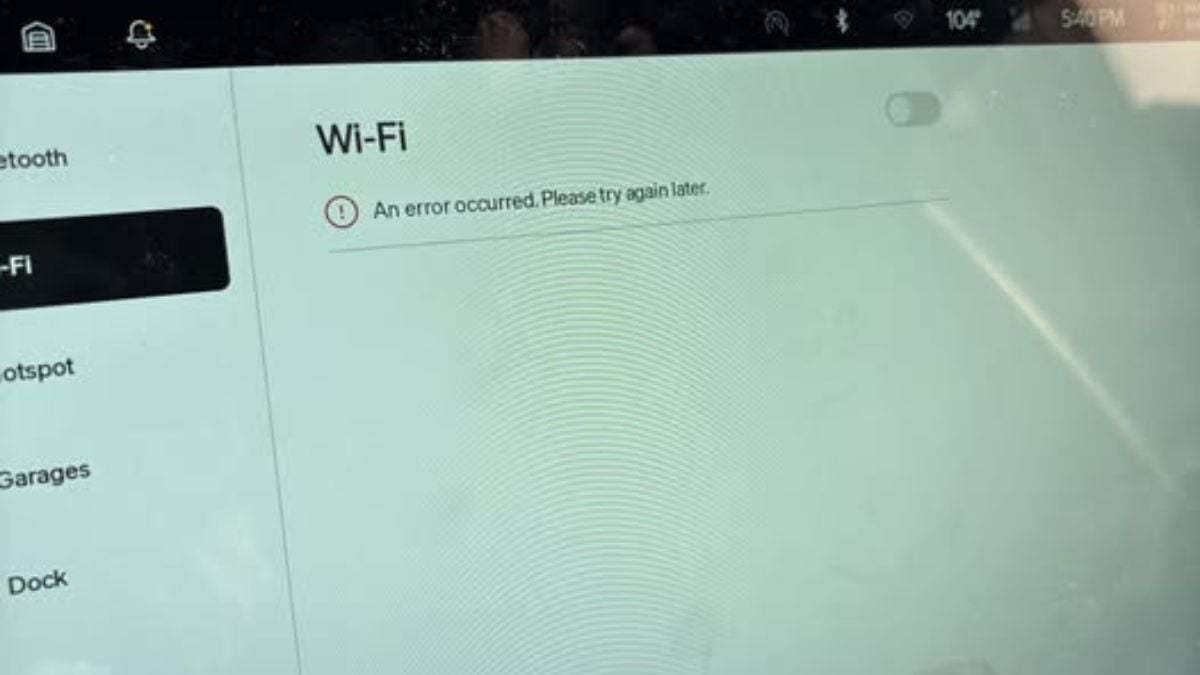
“My Rivian's WiFi is not working, so I'm unable to listen to my music, assuming this is how we connect to Apple Music, Spotify, etc. My SOS button isn't working. I've reset my screen a few times. Can't connect to my home WiFi either. I cannot seem to find other WiFi or manage the WiFi, as those options are greyed out. The next service appt. is 9/15. Anyone dealt with this before?”
When you look at Michi’s post, it’s more than just a small annoyance, it’s a real breakdown in the core user experience. No streaming music means no Apple Music, no Spotify, and no SiriusXM streaming. No SOS functionality? That’s an even more serious concern. Especially considering that Rivian, like most modern automakers, is designing vehicles with the assumption that your car will always be online, whether for navigation, software updates, voice commands, or emergency support.
And what’s especially frustrating in Michi’s case is that these features didn’t just glitch out, they’ve become completely unavailable. The WiFi settings are greyed out, meaning they can't even be selected, let alone reset or reconnected. Despite trying the usual fix, restarting the infotainment screen, nothing worked. And with no Rivian service appointment available until September 15th, that’s over a month of driving with limited functionality and no clear solution in sight.
This Isn’t the First Time a Rivian Owner’s Been Left Waiting
Michi’s story isn’t exactly rare in the Rivian ownership experience. In fact, we’ve recently covered another frustrating issue in an article titled My Rivian Refused to Wake Up From Sleep Mode and Left Me Helpless, Staring at the App for 15 Minutes, Wondering What Was Wrong. That piece explored how an otherwise functional vehicle can become completely unresponsive without warning, and how powerless a driver can feel when the systems they rely on simply stop working.
Connectivity issues aren’t just a minor inconvenience anymore. In an EV world, they can dictate how you drive, when you drive, and whether or not you can access basic creature comforts like music, maps, and climate control remote features.
Community Responses Show How Common and Fixable, Or Not, This Can Be
The post quickly attracted responses from other Rivian owners who had either faced similar issues or had advice to offer. One user, John, replied with a diagnosis that has become all too familiar among early EV adopters:
Advertising
“Given you don’t have cellular either, I’m guessing the communications module has died. Try a hard reset (left button and hazard button) to see if it comes back; otherwise, it’ll probably have to wait until service, unfortunately.”
John’s comment is telling. A failed communications module would explain both the loss of WiFi and SOS functions, since those systems rely on Rivian’s internal telematics unit to stay connected to the internet and emergency response networks. And unfortunately, when that part goes out, there’s not much a typical owner can do without visiting a service center.
But not all hope is lost. Daniel chimed in with a more optimistic take:
“This happened to me one day, and a hard reset fixed it. Long-press the leftmost steering wheel button and the hazards button above the mirror for a few seconds.”
That combination, a deep, hard reset, has worked for some Rivian owners facing a wide variety of system hiccups. And while it’s frustrating that something so vital would require such a workaround, it’s at least worth trying before waiting weeks for a service appointment.
Why This Matters in a Rivian
The big issue here is not just about missing out on Spotify during a commute. It’s about how EVs like Rivians are built to assume connectivity is a given. Features like remote climate control, OTA updates, navigation, driver profiles, and even keyless entry through the phone key system all rely on a functional communication backbone. When that fails, the car doesn’t just become “dumbed down”, it can become outright inconvenient or even unusable in specific situations.
Many owners use their vehicles to plan long-distance road trips using Rivian’s trip planner or third-party charging maps. Without a working network connection, even that can become a challenge.
And let’s not forget that the SOS button is there for a reason, emergencies. Having a broken SOS system isn’t just inconvenient; it could actually be dangerous, especially for drivers venturing out into rural areas or using the vehicle for camping, hiking, or off-road exploration.
What's the Fix?
If you’re dealing with a similar problem in your Rivian, here are a few steps worth trying before you book that service appointment:
- Soft Reset: Hold both scroll buttons on the steering wheel until the screen reboots. This is a standard reset that doesn’t affect your data.
- Hard Reset: As Daniel suggested, press and hold the leftmost steering wheel button along with the hazard light button above the mirror. This can trigger a deeper system restart.
- Check the Tesla App-Compatible Chargers: If you're also facing confusion around charging, don't forget that Rivian's compatibility with Tesla Superchargers depends on location. Having the Tesla app can help you identify compatible ones.
- WiFi Settings: If the WiFi options are greyed out, that likely points to a failure of the vehicle's communications module or internal networking hardware.
Still no luck? Then unfortunately, like Michi, you’re stuck waiting for your service appointment, and hoping they can source the parts in time. As we’ve seen in other EV stories, such as a Hyundai IONIQ 5 owner who used Electrify America nearly 330 times for free, the EV world is full of ups and downs depending on how well the backend support systems are built and maintained.
Journalist Insight: When Connectivity Becomes a Liability
From a journalistic standpoint, Michi’s story highlights something that’s becoming increasingly obvious across the EV landscape: the more software-driven these vehicles become, the more vulnerable they are to system-level failures that are difficult or impossible for the average driver to fix.
In the past, losing your radio signal or having a bad Bluetooth connection was annoying, but manageable. Today, when those issues extend to your entire vehicle network, infotainment system, and emergency communications, you’re not just missing a song, you’re losing control over basic, expected functions. That’s a serious shift in how we relate to our cars.
And while early adopters often understand that new tech comes with hiccups, we’re now years into the Rivian ownership cycle. At some point, these types of issues need to be far less common, especially when service delays stretch out for months, not days.
The Takeaway
Michi’s experience reminds us that even premium EVs with cutting-edge features can sometimes feel a little too “beta.” And while that’s part of the learning curve of driving an electric vehicle, it shouldn’t come at the cost of safety or basic functionality.
If you’re a Rivian owner dealing with similar issues, it’s worth documenting everything, reaching out to service early, and trying every available reset method. But ultimately, these are the types of problems that Rivian as a company needs to address through more robust support, faster parts availability, and proactive software stability improvements.
Have you ever lost access to WiFi or emergency features in your EV? What did you do to fix it, and did the dealership take your concerns seriously? Let me know your experience in the comments below.
Narek Hareyan is a young automotive journalist with experience in a golf cart dealership and an interest in the automotive industry. Follow Narek on X for daily news coverage about cars.
Set Torque News as Preferred Source on Google
Follow us today...