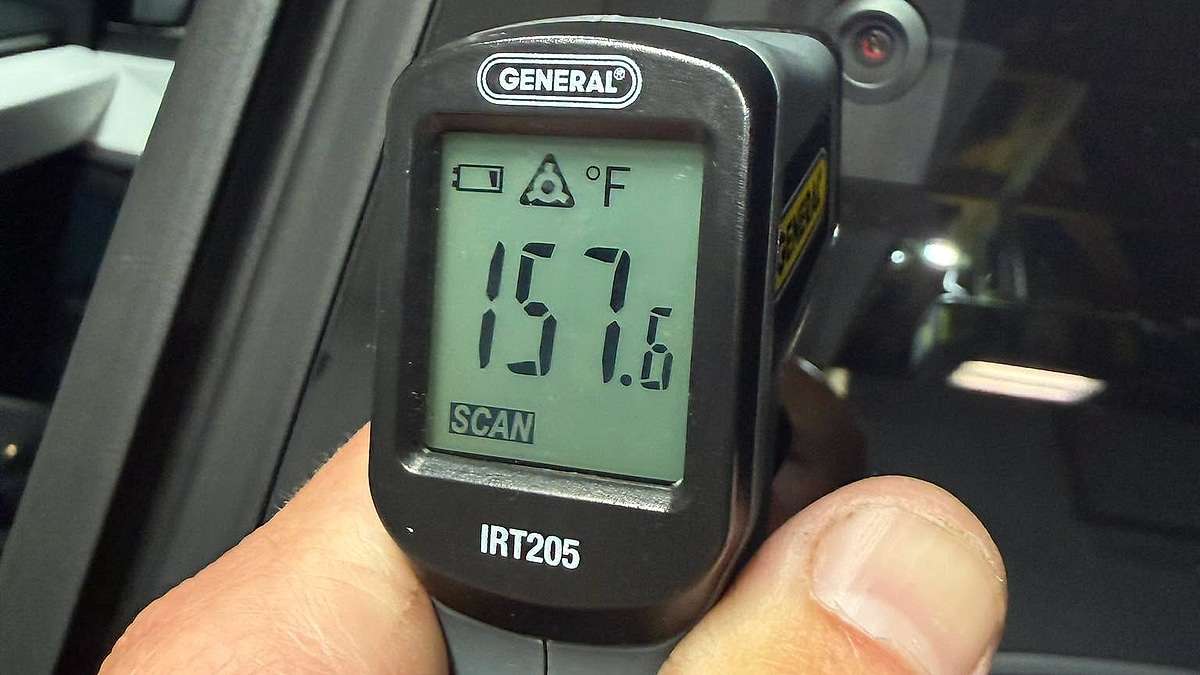

A Cybertruck owner named Josh Crabtree measured his B-pillar camera at over 157°F while the truck sat in a 72°F garage. No FSD errors. No dashboard alerts. Just a camera housing hot enough to make you pull your hand back and wonder.
That detail, no warning at all, is what most of the replies completely missed.
First: The Design You Weren't Told About
The Cybertruck's cameras aren't passive glass eyes bolted to the body. The front bumper camera has a dedicated heater connector, documented explicitly in Tesla's Cybertruck service manual under the front fascia camera removal procedure. The windshield camera has one too. Internal Tesla design documents from 2022 also described a redesign of the B-pillar camera housing for HW4, specifically noting: "a camera heating device is added."
So yes, these cameras are actively heated. That's why they run warm in a cold garage with Sentry Mode on. It's the same principle as a rear-window defroster, miniaturized into a camera housing. Completely normal, until it isn't.
What it doesn't explain is why a camera is hitting 157°F in a climate-controlled space with no demand for defrost.
About That IR Reading
I want to be precise here because half the forum replies got this right and half talked right past it. Standard handheld IR thermometers measure emitted and reflected infrared radiation. Camera lens covers, curved, polished, partially reflective in the mid-IR wavelengths consumer guns operate in, introduce meaningful noise into that measurement. You're not reading the electronics inside.
You're reading a blend of surface temperature and reflected ambient IR, shaped by your gun's emissivity setting and the angle you're holding it. At 157°F on a shiny, curved surface, I'd call the margin of error at least ±20°F in either direction.
The real number might be 130°F. It might be 170°F. We genuinely don't know.
What we do know: Crabtree and at least one other owner in the thread said these housings were hot enough to make you pull your hand back. That's past the 110°F threshold where human skin registers "hot, move." In a 72°F garage. With the truck parked.
The Silent Fault
This is the part that actually interests me.
Tesla's Autopilot ECU has a documented fault code, APP_w388_windshieldCameraHeaterFaulted, that fires when a hardware condition is detected in the windshield camera heater system. When triggered, it tells the owner "Windshield camera defogging is limited" and advises scheduling service. Tessie Stats
But here's the catch: that alert is flagged as "service" visibility. It doesn't surface to the driver. It only appears in Tesla's own service system.
Read that again. The ECU can know your camera heater is misbehaving and you'll never see it.
Now consider: there's no publicly documented B-pillar equivalent of that code. A separate Cybertruck Owners Club thread from May 2025 about a scorching-hot passenger-side door camera drew the same informal diagnosis from other owners: "Sounds like the heater is stuck on." No FSD errors. No alerts. Just heat, and a forum post.
Compare that to the cabin camera failure pattern. When a Cybertruck's cabin camera overheats, FSD throws an error, and Tesla's own guidance is clear: a hot camera housing likely indicates hardware malfunction requiring immediate service and potential replacement.
So the system works like this: cabin camera gets hot, FSD complains, Tesla tells you to come in. B-pillar or door camera gets hot? The truck runs normally. The heater may be stuck at full output in a 72°F garage, and your only signal is a hand-check. That's a meaningful diagnostic gap, and I haven't seen anyone name it directly.
What Facebook Got Right and Wrong
Several replies correctly flagged the IR reading limitations. Valid. What's not valid is using "your thermometer is unreliable" as grounds to dismiss the entire report. A stuck-on heater element in an enclosed camera housing doesn't care how good your IR gun is.
The first thing Crabtree, or anyone in this situation, should try is a dual-scroll-wheel reset followed by a full power-off from the Safety menu. A software glitch can hold a heater element on; a clean reboot often clears it. If the camera cools down and stays cool, you had a software trigger. If the heat comes back after a clean boot, that's pointing at hardware. Either way, the service request Crabtree filed was the right call.
What Comes After One Hot Camera
Tesla's camera heater architecture is genuinely smart engineering. Keeping optics clear in winter matters for a truck that's supposed to offer serious all-weather capability. But the monitoring layer has a gap, specifically around the B-pillar and exterior camera heaters, where a stuck-on condition generates no owner-visible alert.
Whether running a camera housing at sustained high temps shortens component lifespan, degrades lens coatings, or just drains battery during Sentry Mode, the data doesn't exist yet. The Cybertruck is young enough that long-term thermal stress data on these housings simply hasn't accumulated.
That's exactly why Crabtree’s service request matters even if the tech closes it "within spec." The complaint is now documented. If that camera needs replacement at 50,000 miles and Tesla's records show no prior service contact, the warranty conversation is harder. A paper trail costs nothing.
What To Document
If your Cybertruck cameras are running hot while parked: perform a dual-scroll-wheel reset, then execute a full power-off from the Safety menu and wait two minutes. If heat returns after a clean boot, file a service request via the Tesla app. Log the ambient temperature, how long the truck had been parked, whether Sentry Mode was active, and whether any FSD warnings appeared. Take photos. That documentation is your warranty insurance; don't let anyone in a Facebook comment section talk you out of creating it.
Have you checked your Cybertruck's B-pillar or door camera temps, and if so, is there a noticeable difference between cameras that were hot and ones that weren't? Specific temperature readings and ambient conditions would be genuinely useful data here.
Comment down below and let us know.
About The Author
Noah Washington is an automotive journalist based in Atlanta, Georgia, covering sports cars, luxury vehicles, and performance culture. His reporting focuses on explaining the engineering, design philosophy, and real-world ownership experience behind modern vehicles.
Noah has been immersed in the automotive world since his early teens, attending industry events and following the enthusiast communities that shape how cars are built and driven today. His work blends industry insight with enthusiastic storytelling, helping readers understand not just what a car is, but why it matters.
Noah is also a member of the Southeast Automotive Media Association (SAMA), a professional organization for automotive journalists and industry media in the Southeast.
His coverage regularly explores sports cars, luxury vehicles, and performance-driven segments of the automotive industry, including the evolving culture surrounding Formula Drift and enthusiast builds.
Read more of Noah's work on his author profile page.
You can also follow Noah here:
Set Torque News as Preferred Source on Google
Follow us today...