

Every modern truck is part machine and part computer, a balance of steel and software that usually functions with remarkable harmony. Yet even the most capable systems can be tripped by the smallest overlooked detail. That is how one Toyota Tundra owner found himself chasing a simple problem that kept disguising itself as something far more complicated. A dashcam, a handful of SD cards, a dealer visit, and a persistent beeping formed the backdrop of a story that shows how even well-designed systems sometimes hinge on one technical choice hiding in plain sight.
Here is his post in full, exactly as he wrote it:
“I went to the Toyota dealer today to have my winter tires installed and to address the recall for my touchscreen. I also mentioned that my dashcam might have a faulty SD card because it keeps beeping. I asked them how much their SD card costs, since I’ve already tried four different SD cards, but the camera still keeps beeping. This is the price they gave me for the SD card. But the cashier told me to just buy one outside since it would be cheaper, so I didn’t purchase it from them. I tried looking for a solution to calibrate my dashcam. I tried everything again, I read the manual and watched videos on YouTube, but it was still beeping and wouldn’t calibrate. Then I thought about the difference between a regular SD card and an industrial SD card, which is what the manual recommends. I tried formatting the SD card several times on my laptop, but it still kept beeping and wouldn’t calibrate. Finally, I decided to format the SD card one more time, this time using a 32GB card. While formatting, I noticed in the laptop’s format settings that there was an option for FAT32. I tried it, and that was it; the SD card worked, and I was able to calibrate the dashcam. I hope this helps anyone who might be experiencing the same beeping issue with their dashcam.”
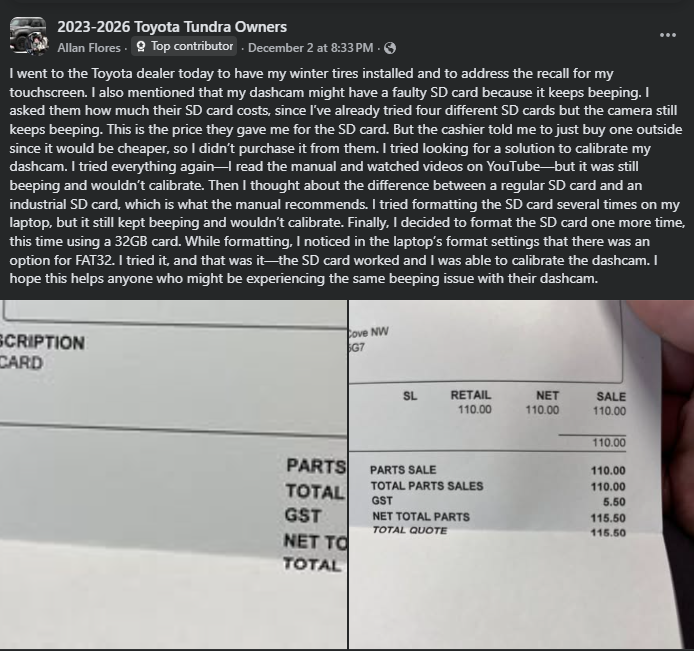
The post captured something familiar to anyone who has wrestled with modern automotive electronics. A straightforward hardware suspicion, in this case a possibly faulty SD card, often masks an underlying compatibility issue. Commenter Paul Wood echoed the reality many technicians have learned through experience when he advised that cards should be reformatted on a computer first, preferably to FAT32.
That simple step can make the difference between a device that reads a card instantly and one that refuses to recognize it at all. Many storage devices arrive formatted for broad consumer use, not for specialized equipment inside a vehicle, and this mismatch can produce symptoms that look more serious than they are.
Toyota Tundra: Toyota’s New Styling
- The latest Tundra feels like Toyota finally leaned into boldness; the grille, the stance, the lighting, everything has more presence, almost as if it’s trying to match its torque output with visual confidence.
- What surprises most new owners isn’t the power, but the refinement: the switch to a modern rear suspension gives the Tundra a calmer highway personality that older models never really nailed.
- Toyota packed the cabin with big-truck energy but didn’t forget usability; the physical controls are placed where your hands naturally fall, and the massive center display is easy to read without feeling like a tablet glued to the dash.
- Even with its tech upgrades, the Tundra keeps that familiar Toyota feel, nothing flashy for the sake of flash. It’s built to handle years of towing, hauling, and weekend abuse without begging for attention.
What gives this story its momentum is how far the owner went before discovering the answer. Four SD cards came and went, each one prompting the same warning beeps. Formatting attempts produced no visual change in behavior. Even the dealership, which was already juggling winter tire work and a touchscreen recall, did not identify formatting as the crucial variable. To their credit, the cashier recommended buying the card elsewhere to save money, a gesture that speaks to the reality that dealership staff often do their best to guide owners even when the problem in question falls into a technical gray area. The overlooked detail was not neglect but the nature of a system that depends on compatibility more than complexity.
Other Tundra owners added their own observations, suggesting the issue was not isolated. Dwayne Roelfs noted that his dashcam sometimes flashed red, blue, and yellow before settling down, a pattern that can indicate the system is struggling to read or write data. Another comment from Dalal Jilani pointed out that deleting old videos through the Toyota Tundra’s dashcam app is sometimes necessary. That advice is sound, since many dashcams preserve specific clips that can eventually clog available space. In this case, however, the owner could not delete anything because the unit no longer detected his 8 GB card at all, which strengthened the suspicion that the problem stemmed from formatting rather than file management.
What stands out is how the breakthrough arrived. It did not come from a service bulletin, a software patch, or a replacement part. It came from a moment of close attention during one more attempt at formatting. A single menu option, FAT32, made the difference. This detail is a reminder that modern vehicles, for all their technology, still require drivers to develop a working understanding of digital tools. It also demonstrates how a logical and patient approach can reveal solutions that appear nowhere in the owner’s manual but make perfect sense once discovered.
The dealership’s part in this story is worth noting. No one acted carelessly or dismissively. They handled a recall, prepared a seasonal tire change, and provided guidance on parts costs. Even well-trained service departments cannot diagnose every digital mismatch on the spot. There are thousands of variables, from card speed ratings to formatting types to firmware expectations. What slipped past the counter and the service bay was not a mistake so much as an example of how challenging it can be to pinpoint a problem that looks like hardware failure when the real issue is a file system choice that most consumers never touch.
The owner’s persistence and willingness to share the final answer are what give the story broader value. A small discovery made in a home office while formatting a memory card may spare other Tundra drivers the same frustration. This is one of the strengths of owner communities. They help decode the places where technology and machinery intersect. In an age when trucks rely on networks of sensors and storage devices as much as they rely on engines and drivetrains, that kind of shared knowledge becomes as important as any tool in a garage. In this case, it turned a beeping dashcam into a quiet and useful one, and it turned a personal annoyance into a solution that many others will now be able to find with far less effort.
Image Sources: Toyota Media Center
Noah Washington is an automotive journalist based in Atlanta, Georgia. He enjoys covering the latest news in the automotive industry and conducting reviews on the latest cars. He has been in the automotive industry since 15 years old and has been featured in prominent automotive news sites. You can reach him on X and LinkedIn for tips and to follow his automotive coverage.
Set Torque News as Preferred Source on Google
Follow us today...







Comments
A good UI/UX would have…
Permalink
A good UI/UX would have alerted the user that the card isn't formed and asked if they wanted to format it. Not surprised though as all accounts in court shows that Toyota software development is deficient.
Many dashcams have an option…
Permalink
Many dashcams have an option to format the card in the format they require. That should wipe any incompatible formatting done previously.
Owner can figure out a…
Permalink
Owner can figure out a camera problem, but has the dealer swap out wheels with tires?... assuming they have 'winter tires' mounted on another set of wheels. I thought most all tires these days were rated for snow/ ice? Maybe they use studded tires for winter.🤷🏻♂️
Thanks for sharing your…
Permalink
Thanks for sharing your experience fellow tundra family!
These camera's usually tell…
Permalink
These camera's usually tell you when the memory card needs to be formatted and then the camera will format it the way it wants to use it.
Shouldn't be that hard.
The story misses the most…
Permalink
The story misses the most important fix. READ THE DASH CAM MANUAL. The manual explains that the SD card must be formatted and shows how to format the sd card while right in the Dash Cam, using the app
Formatting to Fat32 is SOP…
Permalink
Formatting to Fat32 is SOP to use a flash drive for music on my 2017 Tundra. It's mentioned in most any discussion of them. Looks like Toyota decided not to change. Strange the dealership wasn't aware of this.
As a previous dealer tech, I…
Permalink
As a previous dealer tech, I would have known to try a known good SD Card that we could test to see if that's the problem.
Wait until he finds out he…
Permalink
Wait until he finds out he has to put gas in the car. EVER hear about a memory card that didn't need to be formatted?
The fact is every dash-cam…
Permalink
The fact is every dash-cam requires format SD card at first time settings. Good news is most of them been manufactured formatted already. But some of them did not come with any storage solution that we need purchase on our own. Most of those we can format with computer and has to be FAT32. Before doing that we should check dashcam setting if there is format function. Yes? Then the only way to make it working properly is to use dashcam formatting to do so, otherwise it will not recognize the card and gives warning light or/and sound. But dashcam will formats the card with FAT32. That is confusing us a lot. I think that because dashcam will write some special code which for dashcam to recognize the card is ready to use only. The computer’s FAT32 format just universal can be used by most devise without special needed. Remember all the digital cameras have this function within their settings? Same thing.
If the card is larger than…
Permalink
If the card is larger than 32gb then the Windows "Far32" format will not work. You need to format it through a specific set of steps using the Command Prompt (MS DOS). Otherwise your factory cam will just beep at you nonstop. I am using an Amazon Basics 128 GB micros formatted FAT32 at 100GB. Records way more video than the factory 8GB.